My New Laptop Is a Lenovo Legion Go
tech · · 8 min readNetbooks? Remember those? Sub-10-inch, horribly underpowered, miniature laptops? Asus Eee PC? One Laptop Per Child? Netbooks were all the rage in the late 2000’s. And then, like Zune, the Windows Phone, and the Avatar, they disappeared.
Let’s be clear: The netbooks of yesteryear were pieces of utter garbage. Their under-specced innards could barely keep pace with the copies of Windows XP they shipped with; tech journalists dissed these things like automotive journalists mock the Chevy Spark. But folks, I submit to you—we didn’t know how good we had it.
See, when I go shopping for a laptop, I have a checklist:
- Size: Compact, ideally with a screen size 11 inches or smaller. A portable computer should fit inside my backpack, not define my backpack.
- Compatibility: Needs to run PC software; needs to run Linux. Software development is important to me, and you simply can’t do that on Android or iOS.
- Battery life: As long as possible, obviously.
- Performance: Here’s the compromise! I really just need to be able to browse the web, run some programming tools, and maybe do some lightweight gaming (think Phoenix Wright Ace Attorney, not Microsoft Flight Simulator).
- Thermals: As cool and quiet as possible. I mean, I’m not asking for a lot of horsepower here…
- Affordability: My price ceiling for a laptop has been roughly $500 for a long time now. If I wanted to drop $2k on a computer, which is what many high-end ultrabooks are priced at nowadays, I’d rather put the money into a desktop, and get far more performance per dollar.
I have room for exactly three computers in my life. My smartphone fits in my pocket and can place calls and pay my grocery bill. My desktop computer sports a graphics card, a mechanical keyboard, and a set of triple monitors. I want my laptop to be as cheap and as portable as possible—I am not interested in spending a bunch of money on a big, bulky machine that could never hope to compete with the desktop I already own.
Well, I must really be wishing for a unicorn, because no device in the world checks all my boxes!
Laptops, How I Loathe Thee
In 2009, my parents bought me this hulking tank of a Toshiba laptop with a first-generation Intel Core processor and a dedicated Nvidia graphics card. It breathed fire out of its exhaust outlets, it sounded about as loud as a commercial airliner at takeoff (even as an avid player of FlightGear Flight Simulator, I did not appreciate this kind of “immersion”), and it was so heavy that I could incorporate it into a weight-lifting regime. Today’s ultrabooks, marvels of thinness that they are, aren’t quite as easy to criticize as my piece-of-Toshit-ba, but they haven’t exactly advanced as much as I’d hoped, either. Every Intel or AMD laptop today still aims a jet of hot air into your crotch to spin up a Firefox or Windows Explorer process, and that battery never lasts quite as much as you’d like, especially if you want to actually—you know—use the device, and not just stare at Bliss dot jpeg all day.
Then there’s the screen sizes. Browse the laptop section of your local box store and you’ll see my problem right away: Today’s laptops are huge. Like the unbroken lineup of SUV’s and pickups at your local “car” dealership, laptop manufacturers have somehow got it in their heads that all anybody wants is a big, chunky 15-inch or 17-inch display. A 13-inch screen, as featured on the recently-released Macbook Neo and Framework 13, is what counts for “compact” nowadays, and my ideal preference is for something much smaller. For whatever reason—whether it’s the search for higher margins, or the chase for consumers that are always demanding bigger and better—compact laptops have seemingly gone the way of compact smartphones. Gone. Extinct. Dodo.
Never Send a Tablet to Do a PC’s Job
Since I can’t stand modern laptops, I really want to like tablets. They’re small, they’re quiet, and damned if that ChromeOS tablet I daily-drove for about a year didn’t get the best battery life out of any mobile device I’ve ever owned. But the locked-down software every tablet ships with, pinned tightly as it is under the iron grip of Big Tech, is fundamentally unfitting for a computer to me. In 2009, the notion that all your software would soon come exclusively from a walled-off app store, one that you had to pay $100 a year just to write a single line of code for, was novel—and to the thinking computer user, maybe even a little offensive. Well, here we are in 2026, and a whole generation of digital natives has been raised wearing Apple and Google-brand straightjackets. They don’t know anything else. “An iPad replaced my laptop!” shout the tech journos.
We’re the frogs, guys, and the water is just about boiling.
Take the iPad. Paper-thin and paper-light, holding one really does feel like holding the future of computing. But with all software gated behind that App Store license, few open-source developers can justify the annual fees and the mandatory Apple hardware purchase. I mean, I’m all for supporting indie developers, but paying $20/year to license a basic SSH client—something that’s available for free on any other operating system—just rubs me the wrong way. And I’m not sure how it’s managed to escape the scrutiny of the tech press for so long, but Cupertino still dictates to this day that all iOS apps must use Apple’s own Safari browser engine. Many websites do not function correctly if not used in Chrome—thanks to lazy web developers and Google’s near-absolute monopoly on the space—so being unable to run the Chrome engine is, sad to say, a dealbreaker for me.
Things are only slightly better in Mountain View. I’m keeping tabs on the Android Terminal project, which promises to marry the attractive qualities of Android hardware with the capability of a virtual machine running Debian Linux, but as of early 2026, the Internet consensus seems to be “Nice idea, but with all these bugs and crashes, it’s not ready for primetime.” And I had to ditch that ChromeOS tablet after Google removed support for multiple browser profiles from the ChromeOS version of Chrome. Here’s why this is such a big deal to me—so as not to serve up my browsing history to Alphabet and Meta on a silver platter, I always compartmentalize my browsing into two independent sessions. One stays signed in to services that I use a lot. The other doesn’t sign into a damn thing. There are exactly two ways to achieve my setup: Use two browser profiles, or use two different browsers. And if you need a secondary browser, don’t even give ChromeOS any further thought. Like, you could theoretically do it by running the second browser inside the Linux virtual machine, but because browsers do so much for us nowadays, the performance will never be satisfactory. The only real way to run a web browser is to do so natively, on a supported platform.
O Netbooks, Where Art Thou?
Back to netbooks. Where are they today? Well, if you’re an executive in charge of product development for a PC manufacturer, you’re not exactly going to be thrilled by the prospect of making pennies on the dollar for a product that retails for maybe $300, and that you still have to pay Microsoft for a Windows license for. And then Steve Jobs’ 800-pound gorilla, the iPad, buried the concept for good—suddenly, anybody on the market for a computer in this price range had a competitor that could stay unplugged for much longer, that was much easier to use, and that could also keep the kids busy playing Angry Birds.
It’s just tragic, because today’s computing landscape ought to be tilted even more in the netbook’s favor. Intel’s low-end Atom processors now pack some serious punch, desktop Linux is more viable than ever (in no small part thanks to SteamOS), and our digital lives are more reliant on cloud computing than ever before. The concept was sound. It still makes for a great pitch today. For somebody like me, who just needs to run the Firefox browser and Visual Studio Code on the go, a cheap, compact netbook would be the computing equivalent of a Smartcar: Snug. Cozy. Practical. Yet here we are, with the netbook extinct, and the great masses carrying locked-down iPads and Galaxy tablets through the Best Buy checkout line—soon to mount their F-150’s and Surburbans for the drive home.
Okay, so Here’s What I Did Settle On…
The good news is that the story doesn’t end there. Because Valve has brought the netbook back, and it’s here in the form of the Steam Deck.
I mean, no, the Steam Deck is not shaped anything like a laptop (the cottage industry for 3D-printed cases and the tech journalist thought pieces notwithstanding). First of all, it has no built-in keyboard—and its low-resolution, 720p display, optimized for low-spec gaming, is far too undersized to get any productive work done. For something designed as a portable game console, all this is fine! The Deck isn’t a laptop, and it’s not trying to be one.
Some of the Steam Deck’s competitors, however, have made some different—and very interesting—design choices. I’m talking about Lenovo’s Legion Go, which sports detachable controllers (like those on a Nintendo Switch) and a screen that is both larger and that has a much greater pixel count than the Steam Deck’s. These features make the Legion Go totally viable as an ultraportable PC! You can take the controllers off to make the device even more compact (and SFW) and the luxuriously-sized display boasts enough screen estate to comfortably fit a code or spreadsheet editor.
So, take the Legion Go, add a 3D-printed magnetic keyboard attachment, replace the stock Windows operating system with a fully-customizable Linux distribution, and voila! A modern, gaming-capable netbook.
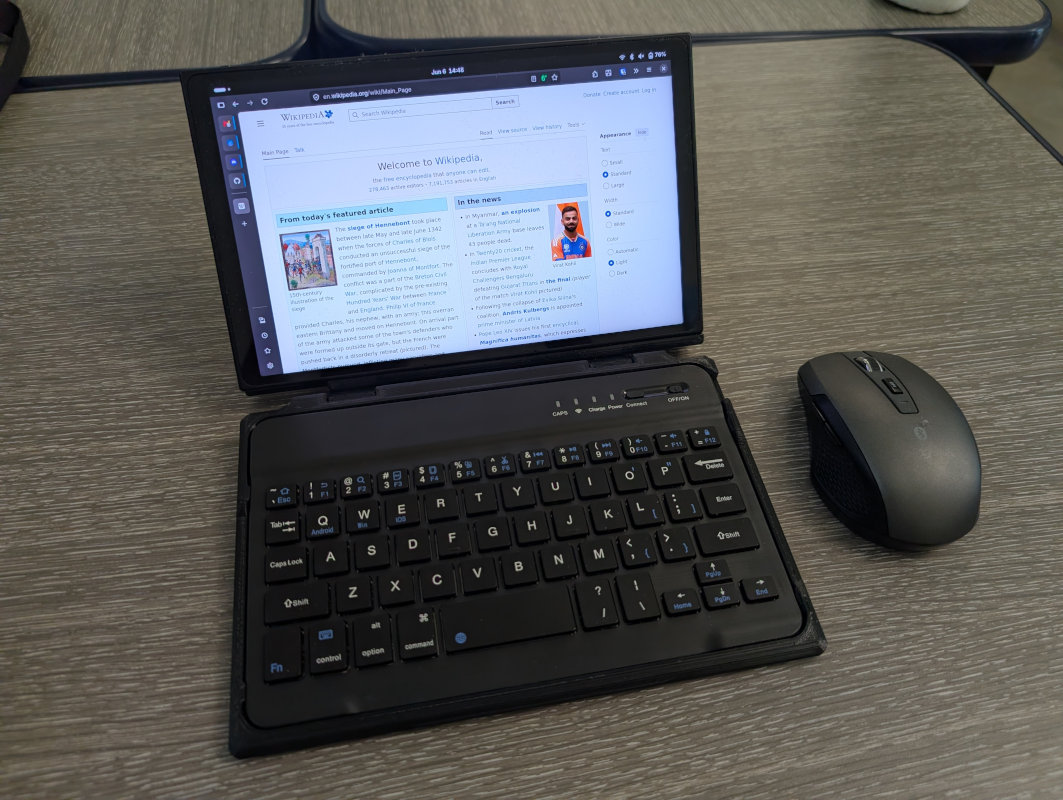
Running Linux on the Legion Go isn’t difficult, because the hardware is fully functional in recent kernels, but I still needed to tinker a fair amount to make the device behave exactly as I wanted it to. You see, Linux generally assumes that the Legion Go is just another desktop or laptop, when in actuality, it’s a multi-mode tablet that may or may not have a keyboard present at all. The Gnome desktop, in particular, does not enable its screen auto-rotate or touch keyboard features out of the box—the only way to tell Gnome “Yes, this is a tablet, so turn on your modes that are appropriate for tablets” is to have one of the input drivers compiled into the Linux kernel transmit a set of special input codes. Since nobody else on the planet has thought of using the Legion Go as a tablet, Linux, quite naturally, does not do that.
Fortunately, it’s possible for a userspace program to do the job instead, so I learned some Rust and wrote just such a service. It uses the presence of a Bluetooth or USB keyboard to determine when to enter or leave tablet mode. (Keyboard present, not a tablet—no keyboard, time to be a tablet. Nice and simple.) In addition to writing that code, I also had to make a bunch of miscellaneous fixes: disabling Wi-Fi power-saving in NetworkManager, adding custom overrides to the hwdb and libinput databases, and even recompiling Mutter with a yet-to-be released fix for screen orientation.
If you’ve purchased a Legion Go and are interested in replicating my setup, you can find all my documentation and source code on GitHub.
I still wouldn’t call the Legion Go my perfect portable computer. Using my checklist, I’d give it an A for size, a C for battery life (that gaming processor is thirsty), an A for performance, a B for thermals, an A for compatibility, and a B for affordability (retail price is quite high, but the Legion Go is easily found for much lower prices on the secondhand and open box markets; I did not have to break my $500 price barrier to score mine). I still have to make some compromises, but overall, I’m quite happy with the end result. And it’s all the more satisfying having gotten the chance to write some code in the process.
What’s my biggest annoyance? Honestly, it’s when I unpack my quirky little device at work to try to get something productive done—and the heads begin to turn and everybody starts asking me questions about it.